
Dynamic File Linking and Access
While you are maintaining an item in Maintain Item Data, with bHot-Link you can access its AutoCAD drawing, Microsoft Word Specifications, Microsoft Excel Costing Data and JPG photo, all in a click from within your Infor Ln session.
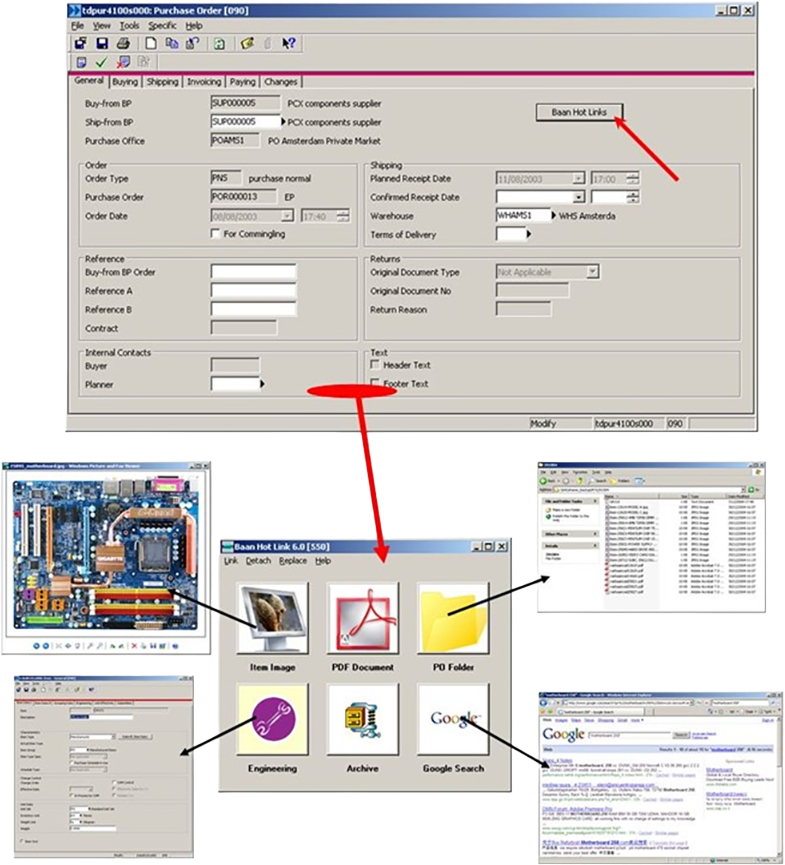
This easy to configure product makes it simple to link any Infor Ln entity with related files on the network. You can activate bHot-Link from any Infor Ln session, and you can add buttons or custom-made GIF files to the sessions without touching source the forms.
Customizable Links with Flexible Naming Conventions
B-HotLink allows the creation of links using up to seven different parts, combining fixed strings, session fields, and dynamic variables. This flexibility makes it easy to build logical file paths and names that match your organization's naming conventions. The tool also supports character replacement (e.g., replacing spaces with underscores) and wildcards to search for multiple files matching a specific pattern.
Integration with File Management
Beyond just linking, B-HotLink allows users to manage files directly from within Infor LN. Users with appropriate permissions can create new files using predefined templates, duplicate existing files for modification or reuse, and link existing files by creating shortcuts to large files without needing to copy them. These operations are tracked in a log file, ensuring that any changes are recorded and can be monitored later.
External Integration with Email and Printers
B-HotLink allows users to email or print linked documents with a single click. This feature is especially useful for sharing data with external partners, like subcontractors or suppliers. Users can define specific links to be included in emails, customize button labels, and even use custom icons for enhanced user experience.
Changeable Images on Sessions
B-HotLink offers a dynamic way to enhance the user experience by displaying context-specific images based on the data within a session. For example, when browsing through employee records, the image displayed can change according to the specific employee being viewed. These images are automatically updated based on predefined naming conventions that link the image files to session data, such as an employee ID or item code.
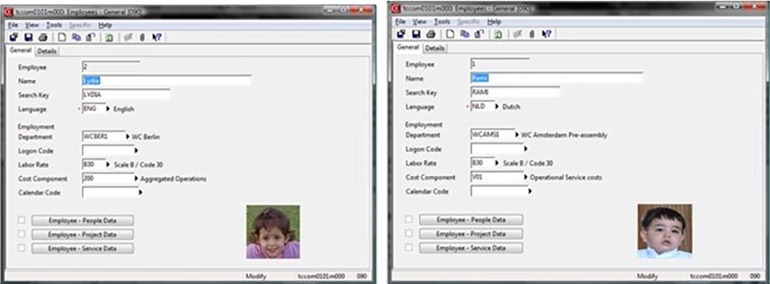
What makes this feature even more powerful is the ability to make these images interactive, allowing users to click on them and be redirected to relevant files, folders, or Infor LN sessions via B-HotLink. This flexibility enhances data visualization and accessibility, providing a richer, more intuitive interface for users.
Security, Scalability and Ease of Deployment
B-HotLink is easy to install and upgrade. The tool's flexible architecture allows organizations to scale usage across multiple sessions and user groups, ensuring that the benefits of integrated file management are accessible to everyone, with only authorized users have the ability to access, create, or modify files using B-HotLink.
B-HotLink is available for all versions of Infor LN and Baan (Previous name was Baan Hot Link). It works on Infor LN UI interface (WebUI), but some features are not available.
Looking for a Modern Solution?
These legacy add-ons served Baan and Infor LN users for decades. For new deployments and modern Infor environments, we recommend B2Win Suite — our unified low-code platform for Workflow Automation, Data Integration, Document Output Management, and Customer Communication Management.